
Enable tracing
This guide contains the steps to enable tracing with Grafana Tempo for your MySQL application.
Caution
This is feature is in development. It is not recommended for production environments.
Prerequisites
Charmed MySQL for machines: Revision 237+ or
Charmed MySQL for Kubernetes: Revision 146+
Fully configured monitoring with COS
Deploy Tempo
First, switch to the Kubernetes controller where the COS model is deployed:
juju switch <k8s_controller_name>:<cos_model_name>
Then, deploy the dependencies of Tempo following this tutorial.
To summarize:
Deploy the MinIO charm
Deploy the s3 integrator charm
Add a bucket in MinIO using a python script
Configure s3 integrator with the MinIO credentials
Finally, deploy and integrate with Tempo HA in a monolithic setup.
Offer interfaces
Next, offer interfaces for cross-model integrations from the model where Charmed MySQL is deployed.
To offer the Tempo integration, run
juju offer <tempo_coordinator_k8s_application_name>:tracing
Then, switch to the Charmed MySQL VM model, find the offers, and integrate (relate) with them:
juju switch <mysql_controller_name>:<mysql_model_name>

juju find-offers <k8s_controller_name>:
Do not miss the “
:” in the command above!
Below is a sample output where k8s is the K8s controller name and cos is the model where cos-lite and tempo-k8s are deployed:
Store  URL                            Access  Interfaces
k8s    admin/cos.tempo                admin   tracing:tracing
Next, consume this offer so that it is reachable from the current model:
juju consume k8s:admin/cos.tempo
Consume interfaces
First, deploy Grafana Agent from the 1/stable channel:
juju deploy grafana-agent --channel 1/stable
Then, integrate Grafana Agent with Charmed MySQL:
juju relate mysql:cos-agent grafana-agent:cos-agent
Finally, integrate Grafana Agent with the consumed interface from the previous section:
juju relate grafana-agent:tracing tempo:tracing
Wait until the model settles. The following is an example of the juju status --relations on the Charmed MySQL model:
Model     Controller  Cloud/Region         Version  SLA          Timestamp
mysql     lxd         localhost/localhost  3.5.4    unsupported  19:15:55Z

SAAS   Status  Store       URL
tempo  active  k8s         admin/cos.tempo

App            Version          Status   Scale  Charm          Channel      Rev  Exposed  Message
grafana-agent                   blocked      1  grafana-agent  1/stable     452  no       Missing ['grafana-cloud-config']|['grafana-dashboards-provider']|['logging-consumer']|['send-remote-write'] for cos-a...
mysql          8.0.37-0ubun...  active       1  mysql                         0  no

Unit                Workload  Agent  Machine  Public address  Ports           Message
mysql/0*            active    idle   0        10.205.193.32   3306,33060/tcp  Primary
  grafana-agent/0*  blocked   idle            10.205.193.32                   Missing ['grafana-cloud-config']|['grafana-dashboards-provider']|['logging-consumer']|['send-remote-write'] for cos-a...

Machine  State    Address        Inst id        Base          AZ  Message
0        started  10.205.193.32  juju-4f3e50-0  ubuntu@22.04      Running

Integration provider  Requirer                 Interface              Type         Message
grafana-agent:peers   grafana-agent:peers      grafana_agent_replica  peer
mysql:cos-agent       grafana-agent:cos-agent  cos_agent              subordinate
mysql:database-peers  mysql:database-peers     mysql_peers            peer
mysql:restart         mysql:restart            rolling_op             peer
mysql:upgrade         mysql:upgrade            upgrade                peer
tempo:tracing         grafana-agent:tracing    tracing                regular
Model     Controller  Cloud/Region        Version  SLA          Timestamp
mysql     k8s         microk8s/localhost  3.5.4    unsupported  16:33:26Z

SAAS   Status  Store       URL
tempo  active  k8s         admin/cos.tempo

App                Version                  Status  Scale  Charm              Channel      Rev  Address         Exposed  Message
grafana-agent-k8s  0.40.4                   active      1  grafana-agent-k8s  1/stable     115  10.152.183.63   no       grafana-dashboards-provider: off, logging-consumer: off, send-remote-write: off
mysql-k8s          8.0.37-0ubuntu0.22.04.3  active      1  mysql-k8s                         0  10.152.183.135  no       Primary

Unit                  Workload  Agent      Address       Ports  Message
grafana-agent-k8s/0*  active    idle       10.1.241.255         grafana-dashboards-provider: off, logging-consumer: off, send-remote-write: off
mysql-k8s/0*          active    executing  10.1.241.253         Primary

Integration provider                Requirer                   Interface              Type     Message
grafana-agent-k8s:peers             grafana-agent-k8s:peers    grafana_agent_replica  peer
grafana-agent-k8s:tracing-provider  mysql-k8s:tracing          tracing                regular
mysql-k8s:database-peers            mysql-k8s:database-peers   mysql_peers            peer
mysql-k8s:restart                   mysql-k8s:restart          rolling_op             peer
mysql-k8s:upgrade                   mysql-k8s:upgrade          upgrade                peer
tempo:tracing                       grafana-agent-k8s:tracing  tracing                regular
Note
All traces are exported to Tempo using HTTP. Support for sending traces via HTTPS is an upcoming feature.
View traces
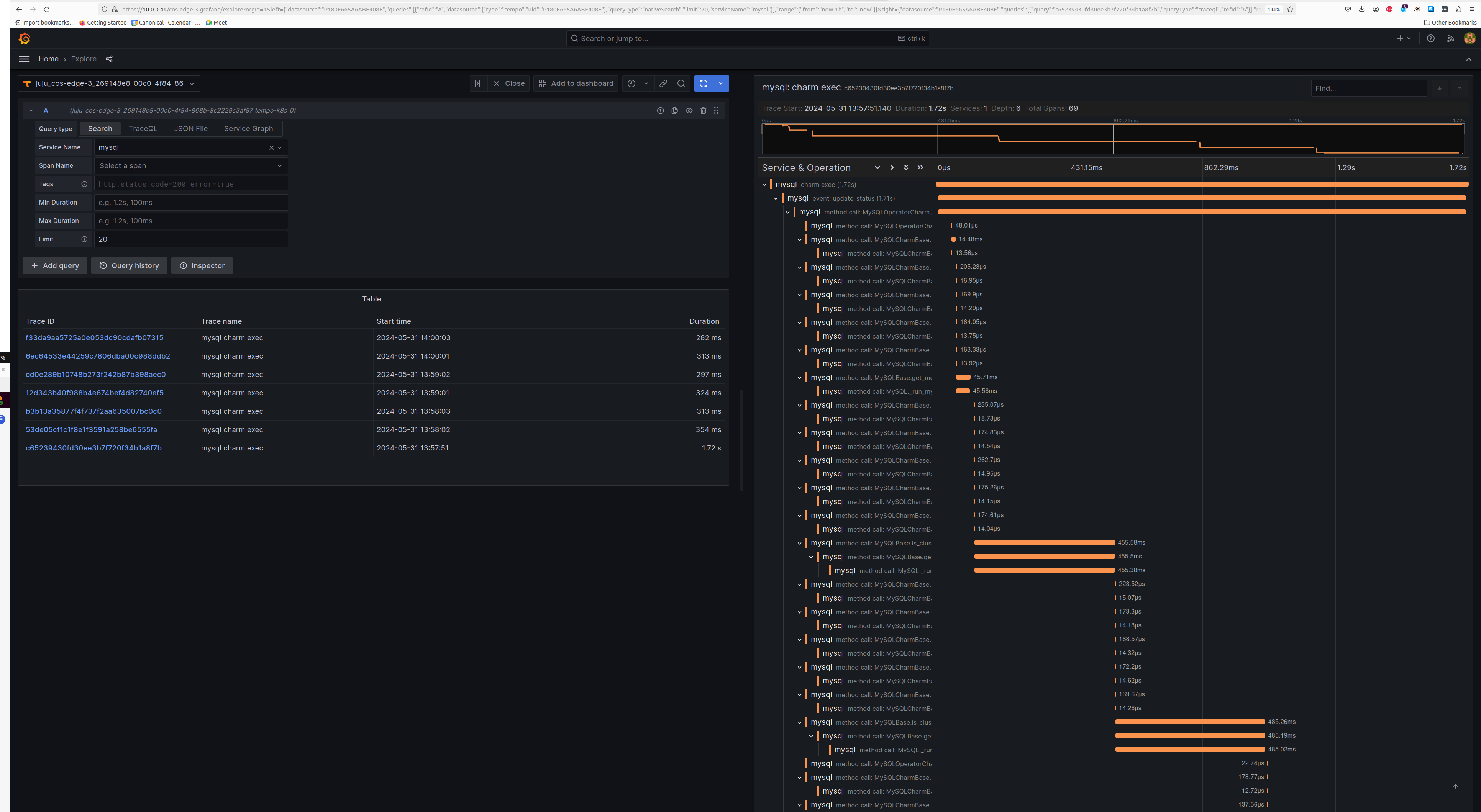
The Tempo traces will be accessible from Grafana under the Explore section with tempo-k8s as the data source. You will be able to select mysql as the Service Name under the Search tab to view traces belonging to Charmed MySQL.
Screenshot
Feel free to read through the Tempo HA documentation at your leisure to explore its deployment and its integrations.